
The Sofabets mobile application delivers the complete sportsbook and casino experience optimized for Kenyan networks. Install the native app on your Android or iOS device and access thousands of betting markets, live dealer tables, slot machines, and Aviator crash games wherever you are — Nairobi CBD, Mombasa beachfront, or rural towns with 3G coverage. The app uses adaptive streaming technology to minimize data consumption while maintaining smooth gameplay even during peak traffic hours.
Battery optimization algorithms extend your device's charge during marathon betting sessions. M-Pesa integration works identically to the web version with instant deposits and 24-hour withdrawal processing. Push notifications alert you about bet settlements, bonus credits, and live match events so you never miss an opportunity.
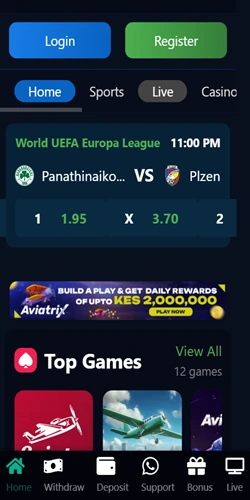
The mobile application launched alongside the web platform in 2024 as part of Down Town Bets Kenya Limited's mobile-first strategy. Development prioritized Kenyan user behaviors — short betting sessions during commutes, data-conscious streaming, and offline bet slip saving for areas with unreliable connectivity.
| Platform Support | Android 7.0+, iOS 12+ |
| App Size | Android: 42 MB, iOS: 38 MB |
| Installation Method | APK direct download (Android), TestFlight/Enterprise (iOS) |
| Update Frequency | Bi-weekly updates with bug fixes and feature additions |
| Data Usage | Approximately 15-25 MB per hour of active use |
| Offline Features | Bet slip caching, account history viewing |
| Security | 256-bit SSL encryption, biometric login support |
| Languages | English (British English) |
| Push Notifications | Bet results, bonuses, live score updates |
Android installation bypasses Google Play Store restrictions on real-money gambling apps in Kenya. The APK file downloads directly from the Sofabets website, whereby you manually install it through your device settings. This process takes roughly 2-3 minutes from start to finish.
Open your mobile browser (Chrome, Firefox, or Samsung Internet) and navigate to the Sofabets Home. Locate the "Download App" button typically positioned in the site header or a dedicated mobile app section. Tap this button to initiate the APK download — file size is approximately 42 MB, so ensure adequate storage space and stable connection.
Once the download completes, your browser prompts you to open the file. Before proceeding, enable "Install from Unknown Sources" in your Android security settings: go to Settings > Security > Unknown Sources and toggle it on. Return to the downloaded APK and tap Install. The system verifies the package integrity, then installs the application within 30-45 seconds.
After installation concludes, open the Sofabets app from your home screen or app drawer. Log in using your existing account credentials (phone number and password) or complete new registration directly through the app interface. The first launch downloads essential assets like game thumbnails and provider logos, consuming an additional 10-15 MB of data.
iOS users face Apple App Store restrictions on gambling applications, so Sofabets distributes through TestFlight beta program or enterprise certificates. The installation method depends on current Apple policies and regional availability — check the website for the active distribution channel.
For TestFlight installation, you'll first need to download the TestFlight app from the official App Store. Once TestFlight is installed, visit the Sofabets website on your iPhone or iPad and tap the iOS download link. This redirects you to a TestFlight invitation page; accept the invitation to add Sofabets to your TestFlight apps.
Enterprise certificate distribution works differently. Tap the iOS download link on the Sofabets site, which downloads a configuration profile to your device. Navigate to Settings > General > Profiles & Device Management, locate the Sofabets profile, and tap Trust. Return to your home screen where the app icon now appears; launch it to complete setup.
Note that enterprise certificates occasionally require re-trust after Apple revocations — typically every 3-6 months. The operator sends push notifications through the web version when certificate renewal is necessary, so you won't lose access unexpectedly.
Pre-load your favorite betting markets and teams for instant wager placement. Bet slip saves selections offline, then submits automatically when connectivity restores. Quick bet feature confirms wagers with single tap — no multi-step confirmation screens.
Select matches stream directly within the app interface at 480p resolution optimized for mobile data. Kenyan Premier League fixtures, major European football, and tennis tournaments available. Streams sync with live betting odds for in-play wagering.
Configure push notifications for specific events — goal scored in followed matches, odds shifts on saved bets, bonus expiration warnings, withdrawal approvals. Notification frequency adjustable from real-time to daily digest mode.
Replace password entry with fingerprint or Face ID authentication. Quick login reduces access time to under 2 seconds while maintaining account security. Option to require biometric approval for withdrawals and bet placements over KES 5,000.
Reduce bandwidth consumption by 40-60% through image compression and background process throttling. Essential for users on limited mobile data bundles. Mode activates automatically when connection drops below 3G speeds.
Access identical casino portfolio as desktop — 800+ slots, live dealer studios, table games, Aviator crash game. Games load with mobile-optimized touch controls and portrait/landscape orientation support. No feature restrictions compared to web version.
Minimum OS version: Android 7.0 Nougat (2016). Recommended: Android 9.0+ for optimal performance. RAM: 2 GB minimum, 3 GB+ recommended. Storage: 100 MB free space for installation plus cache. Processor: Quad-core 1.4 GHz or better.
Minimum OS version: iOS 12 (iPhone 5S and newer). Recommended: iOS 14+ for full feature access. Compatible with iPhone, iPad, iPod Touch. Storage: 80 MB free space required. Internet connection: 3G minimum, 4G/WiFi recommended for live streaming.
Minimum connection: 3G with 384 Kbps for basic betting functions. Recommended: 4G LTE for live streaming and real-time odds updates. WiFi optimal for initial app download and game library loading. Works on Safaricom, Airtel, Telkom Kenya networks.
Installation failures on Android typically stem from insufficient storage or disabled unknown sources. Verify you have at least 100 MB free space by checking Settings > Storage. If the APK won't install after enabling unknown sources, clear your browser's download cache and re-download the file — corrupted downloads cause installation errors.
iOS users encountering "Untrusted Enterprise Developer" messages must manually trust the certificate through Settings > General > Profiles & Device Management. Locate the Sofabets profile, tap it, then select Trust. If the profile doesn't appear, delete the app and reinstall through the website download link.
Login problems usually indicate incorrect credentials or account suspension. Reset your password through the "Forgot Password" link on the login screen. If reset fails, contact 24/7 customer support via live chat — available through both the app and website. Account verification issues require uploading government-issued ID through the KYC section in account settings.
Slow performance or frequent crashes suggest insufficient device resources. Close background apps to free RAM, clear the app cache through Settings > Apps > Sofabets > Storage > Clear Cache. Updating to the latest app version resolves most stability issues — check for updates bi-weekly through the in-app notification system.
SOFABETS is licensed by BCLB (Betting Control and Licensing Board of Kenya) under the Betting, Lotteries and Gaming Act, Cap 131, Laws of Kenya under License Number BK0000687















Gambling can be addictive. Play responsibly and only bet what you can afford to lose. If you or someone you know has a gambling problem, seek help immediately. Must be 18+ to participate.
© 2025 Sofabets Kenya. All rights reserved.
 Download for Android
 Download for iOS